Inbound API
Submit raw RFC 822 or EML messages to a Kurrier mailbox through the hosted API.
Inbound API
The Inbound API lets an application submit a raw email message directly to Kurrier. Kurrier parses and stores the message, then makes it available in the selected inbound identity's Inbox.
Use this integration when your application already receives or generates RFC 822/EML messages and you want Kurrier to provide the mailbox, search, and inspection experience.
The Inbound API is intended for application integrations. If you want to receive internet email for your own domain, connect a supported inbound provider instead.
Create an inbound identity
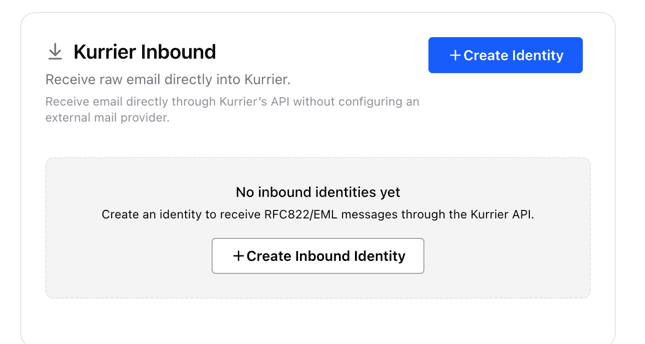
- Open Settings → Providers → Inbound.
- Select Create Identity.
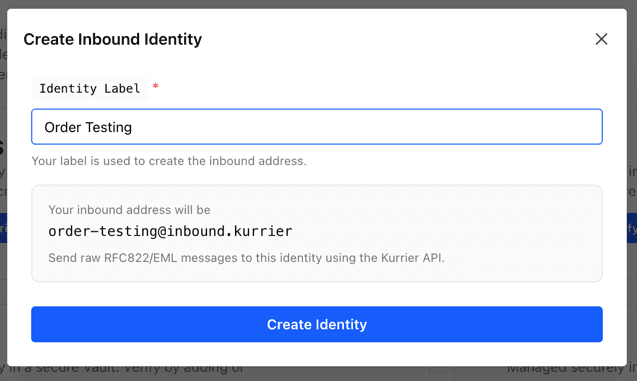
- Enter a descriptive label, such as
Order Testing. - Save the identity.
- Copy the identity ID shown by Kurrier.
Kurrier creates an internal address similar to:
order-testing@inbound.kurrierThis address identifies the mailbox inside Kurrier. It is not a public SMTP address and does not receive internet mail directly.
Create an API key
Inbound requests use a Kurrier API key. Create a key with only the permissions required by your integration, and store it in your application's secret manager.
Send the key as a bearer token:
Authorization: Bearer YOUR_API_KEYSee API authentication for API-key setup and management.
API keys are secrets. Never place one in browser code, commit it to a repository, or include it in a support request.
Submit a message
Send a POST request to your hosted Kurrier inbound endpoint:
POST https://YOUR_KURRIER_HOST/api/kurrier/inboundInclude the destination identity and content type:
X-Kurrier-Identity: YOUR_IDENTITY_ID
Content-Type: message/rfc822
Example
curl -X POST 'https://YOUR_KURRIER_HOST/api/kurrier/inbound' \
  -H 'Authorization: Bearer YOUR_API_KEY' \
  -H 'X-Kurrier-Identity: YOUR_IDENTITY_ID' \
  -H 'Content-Type: message/rfc822' \
  --data-binary $'From: sender@example.com\r\nTo: order-testing@inbound.kurrier\r\nSubject: Test message\r\nMessage-ID: <test-001@example.com>\r\n\r\nHello from the Kurrier Inbound API.'
Replace YOUR_KURRIER_HOST with the host used by your Kurrier workspace.
Submit an EML file
You can submit an existing .eml file without converting it to JSON:
curl -X POST 'https://YOUR_KURRIER_HOST/api/kurrier/inbound' \
  -H 'Authorization: Bearer YOUR_API_KEY' \
  -H 'X-Kurrier-Identity: YOUR_IDENTITY_ID' \
  -H 'Content-Type: message/rfc822' \
  --data-binary @message.eml
Use --data-binary so that curl preserves the message body and line endings.
Kurrier supports standard MIME messages, including HTML, plain text, multipart content, headers, and attachments.
Successful response
A successful request returns the matched identity and stored message:
{
  "success": true,
  "data": {
    "identity": {
      "id": "YOUR_IDENTITY_ID",
      "value": "order-testing@inbound.kurrier"
    },
    "message": {
      "...": "..."
    }
  }
}
The message then appears in the inbound identity's Inbox.
Duplicate messages and retries
Provide a stable, unique Message-ID for every distinct message:
Message-ID: <unique-id@example.com>Kurrier uses message identity while storing mail. Retrying the same message may therefore be treated as a duplicate instead of producing another mailbox entry.
Common uses
- Importing RFC 822 or EML messages
- Email testing and QA environments
- Application-generated test messages
- Forwarding mail received by another service
- Custom inbound-processing pipelines
If a valid request does not create a message, confirm the identity ID, API-key permissions, content type, and raw message structure before contacting Kurrier Support.